DTorch: An Easier-to-Use PyTorch Distributed Inference API — Based on Single-Controller and Distributed Tensor
1 Overview
DTorch is an easy-to-use PyTorch distributed inference API — no multi-processes, no SPMD, no ProcessGroup setup — just write single-device code as usual, then make one small change: replace Tensor with DTensor (a Tensor carrying the information of "which devices it is distributed on and how it is sharded") — DTorch automatically completes the resource management, scheduling and communication of the distributed system.
In PyTorch, however, multi-GPU programs cost far more to develop than single-GPU programs. When writing multi-GPU programs in PyTorch, users need to launch multiple processes through torchrun, follow the SPMD (Single Program Multi Data) paradigm, manually manage the ProcessGroup, and describe the computation from the view of a single GPU. When different GPUs need to execute different code, users must also distinguish the behavior of each GPU with if-else branches in the code. The overall comparison of the two is shown in Table 1:
| PyTorch | DTorch | ||
|---|---|---|---|
| Programming paradigm | Multi-Controller + SPMD | Single-Controller | |
| DTensor support | alpha state | native support | |
| Ease of use of the distributed interface | DDP | ⭐️⭐️⭐️ | ⭐️⭐️⭐️ |
| TP, PP&EP | ⭐️⭐️ | ⭐️⭐️⭐️ | |
| Reinforcement learning | ⭐️ | ⭐️⭐️⭐️ | |
| Summary | poor | excellent | |
| Flexibility of the distributed interface | extremely high | high | |
| Programming view | local view of the distributed cluster | global view of the distributed cluster | |
| Scheduling overhead | extremely low | low | |
| Resource management | managed manually by the user | managed automatically by the framework | |
| Task sharding | sharded manually by the user | sharded automatically by the framework | |
2 Comparing DTorch and PyTorch example code
Below, taking "create and print a distributed Tensor sharded along dimension 0" as an example, compare the DTorch and PyTorch ways of writing:
The two sides compared step by step:
- Launching: DTorch runs as a single process and single thread with
python3 test.py; PyTorch needstorchrunto launch 2 processes, with all processes executing the same code (SPMD). - Device management: DTorch declares the device mesh through
DeviceMesh("cpu", [0, 1]), and the devices are managed by the framework; PyTorch needs to manually callinit_process_groupto initialize the ProcessGroup,set_device(rank)to bind a GPU, and relies onrankto distinguish the behavior of each process. - Data sharding: DTorch declares sharding along dimension 0 through
[Shard(0)], and the sharding and communication are done automatically by the framework; PyTorch needs to manually compute the local shape withshape[0] // world_size, each process holding only local data of shape(2, 3). - Printing data: DTorch prints the global shape (
(4, 3)) plusdevice_meshandplacementsdirectly; in PyTorch each process can only print its local data, and to get the complete Tensor one must manually allocate buffers,all_gatherandconcat. - Resource cleanup: DTorch handles it automatically in the framework; PyTorch requires
destroy_process_group()to destroy manually.
To sum up: in PyTorch, "how the Tensor is distributed" is not recorded in the program — it is expressed explicitly by the user through rank, shape computation and collective communication; in DTorch, this information is carried by the DTensor (DeviceMesh and Placements), and the sharding, communication and device binding are all completed automatically by the framework.
3 Background and foundations
3.1 Single-Controller and Multi-Controller
When scaling a deep learning program from a single GPU to multiple GPUs and machines, the system must answer a fundamental question: who decides which GPU executes which part of the computation? The role that handles Tensor sharding, task dispatch, communication coordination and resource management is the Controller. By the number and placement of Controllers, distributed systems fall into two paradigms:
- Multi-Controller (used by PyTorch): each GPU is managed by one Controller process; the process is both controller and executor, directly driving the local GPU and coordinating with other processes through collective communication; all processes execute the same code, i.e., the SPMD paradigm. Users program from the local view of the distributed cluster. Representative systems: PyTorch
torch.distributed(DDP / FSDP), Megatron-LM, DeepSpeed. - Single-Controller (used by DTorch): the whole cluster has only one Controller, uniformly managing all GPU resources. The user describes the computation in one ordinary process, from the global view of the distributed cluster; data sharding, task dispatch and communication coordination are all completed automatically by the framework. This paradigm was first used in TensorFlow v1 and is discussed in detail in Pathways. Representative systems: TensorFlow v1, Pathways, DTorch.
The architectural comparison of the two is shown in Figure 1; see Single-Controller and Multi-Controller for a complete introduction of the concepts.
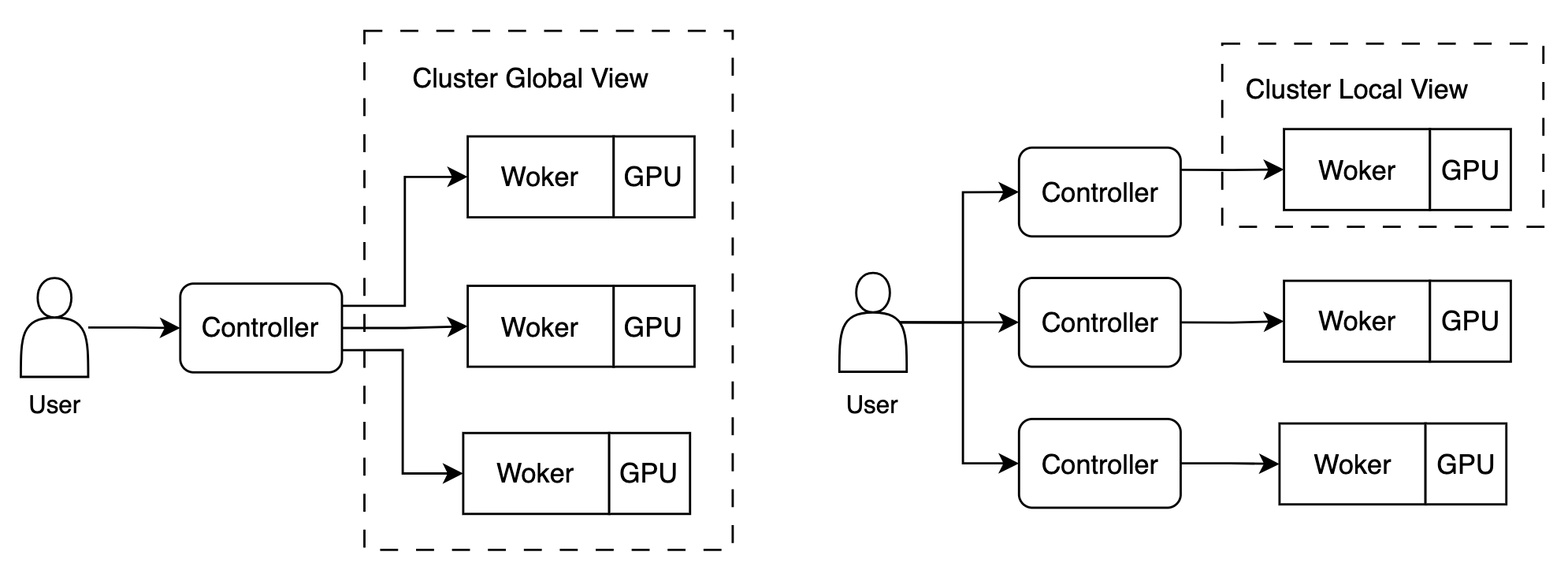
Single-Controller and Multi-Controller are the most fundamental difference between DTorch and PyTorch (PyTorch also supports DTensor experimentally, so DTensor is not the fundamental difference between the two). The comparison of the two is shown in Table 2:
| Single-Controller | Multi-Controller | Notes | |
|---|---|---|---|
| Programming view | global view of the distributed cluster | local view of the distributed cluster | |
| Ease of use of the distributed interface | good | poor | |
| Resource management | automatic, by the system | manual, by the user | global device management, device virtualization, automatic node failure recovery |
| Task sharding | automatic, by the system | manual, by the user | communication deadlock avoidance, auto parallel |
| Flexibility of the distributed interface | high | extremely high | |
| Scheduling overhead | low | extremely low | DTorch reduces Single-Controller's scheduling overhead |
3.1.1 Advantages of Single-Controller
The advantages of Single-Controller: 1. good ease of use of the distributed interface; 2. based on the global view of the distributed cluster, it can provide automatic resource management and task sharding.
The biggest reason DTorch chose Single-Controller is ease of use. Single-Controller describes the computation from the global view of the distributed cluster, which is naturally consistent with the user's way of thinking. The Single-Controller + DTensor approach can concisely express the parallel schemes needed for distributed deep learning computation (Data Parallel, Tensor Parallel, Pipeline Parallel, MoE Parallel, ZeRO and RL training workflow orchestration, etc.), greatly reducing the cost of developing, modifying, maintaining and debugging distributed code.
Second, Single-Controller provides a global view of the computation devices (CPU, GPU) and the computation graph, enabling global device management, device virtualization, automatic node failure recovery, communication deadlock avoidance, auto parallel, JIT compilation (torch.compile) and other capabilities.
3.1.2 Disadvantages of Single-Controller
The disadvantages of Single-Controller: 1. higher system scheduling overhead; 2. less interface flexibility than Multi-Controller.
On scheduling overhead: in Multi-Controller, the Controller is on the same machine as the GPU, and scheduling only goes through PCIe; Single-Controller schedules remote GPUs through cross-machine network communication, so the overhead is larger. To mitigate this, DTorch adopts the Single-Client Single-Controller Multi-Worker asynchronous architecture, where the components execute asynchronously; see the blog DTorch Architecture Design: How Simplicity and Efficiency Are Achieved Together for details.
Because the code executed on each process in Multi-Controller can be completely different, it can support the MPMD (Multi Program Multi Data) paradigm, whose flexibility is extremely high. In theory, any code requiring parallel programming can be implemented with the MPMD paradigm. Currently large models have converged on the Transformer architecture; the excessive flexibility of the MPMD paradigm brings no benefit, and instead its poor ease of use is becoming a liability.
3.2 PyTorch's distributed interface
3.2.1 Interface introduction
PyTorch's distributed interface adopts the SPMD paradigm: it creates one management process per GPU, each process runs the same code, processes are distinguished by rank id, and a ProcessGroup component provides collective communication between processes. Since each GPU has its own management process, this paradigm is classified as Multi-Controller. Its example code:
# Launch: torchrun --standalone --nnodes=1 --nproc-per-node=2 test.py
# number of processes = nnodes * nproc-per-node

import torch
import torch.distributed as dist

def main():
    # Initialize the ProcessGroup and get the world_size and rank variables
    # world_size: number of processes
    # rank: process id, in the range [0, world_size)
    dist.init_process_group('nccl')
    world_size = dist.get_world_size()
    rank = dist.get_rank()

    # specify the cuda device id bound to the current process
    torch.cuda.set_device(rank)

    # create a Tensor of shape=(4, 3), sharded along dimension 0; each GPU holds part of the Tensor.
    shape_total = (4, 3)
    shape_this_rank = (shape_total[0] // world_size, shape_total[1])
    x = torch.rand(shape_this_rank, device='cuda')

    # rank=0, x.shape=torch.Size([2, 3]), cuda:0
    # rank=1, x.shape=torch.Size([2, 3]), cuda:1
    print(f"{rank=}, x: {x.shape}, {x.device}")

    # gather the tensors from all processes; each GPU holds the complete Tensor
    gathered_tensors = [torch.zeros_like(x) for _ in range(world_size)]
    dist.all_gather(gathered_tensors, x)
    gathered_tensors = torch.concat(gathered_tensors, dim=0)

    # rank=0, gathered_tensors.shape=torch.Size([4, 3]), cuda:0
    # rank=1, gathered_tensors.shape=torch.Size([4, 3]), cuda:1
    print(f"{rank=}, gathered_tensors: {gathered_tensors.shape=}, {gathered_tensors.device}")

    dist.destroy_process_group()

if __name__ == "__main__":
    main()
3.2.2 Evolution history
Data Parallel is the earliest form of parallel training: each GPU holds the complete model, processes different batches of data, and after the forward and backward passes the gradients are averaged through AllReduce to get gradients identical to single-machine training. To implement Data Parallel, PyTorch implemented DDP based on the SPMD paradigm. The SPMD paradigm matches Data Parallel very well: create multiple processes, each executing the same code and processing different data.
Megatron-LM continues the SPMD paradigm to implement Tensor Parallel and Pipeline Parallel. But at this point the code executed by each process is not exactly the same: conditional branches must be inserted in the middle to execute different code on different processes (communication needs to obtain the corresponding TP or PP ProcessGroup; in PP, the first rank and the last rank need to run the pre- and post-processing code separately). At this point, the more accurate name should be MPMD (Multi Program Multi Data).
LLM inference and reinforcement learning training need a central control node that interacts with the client (in LLM inference, the main process listens on a port, runs the execution engine and returns results) or schedules the computation flow (in RL, inference, reward and training need to be executed). vLLM and veRL introduced Ray for this, forming a hybrid paradigm of Single-Controller + Multi-Controller.
Inspired by other frameworks, PyTorch has also implemented DTensor, but it is still in alpha state and under development. PyTorch's DTensor has not yet been widely used in mainstream large-model training and inference frameworks.
The evolution of PyTorch's distributed interface and the degree of adaptation at each stage are shown in Table 3:
| Time | Paradigm | PyTorch adaptation | DTorch adaptation | |
|---|---|---|---|---|
| single-GPU Eager | 2016 | Single-Controller | ⭐️⭐️⭐️ | ⭐️⭐️⭐️ |
| DDP | 2018 | SPMD (Multi-Controller) | ⭐️⭐️⭐️ | ⭐️⭐️⭐️ |
| TP, PP&EP | 2019~2022 | MPMD (Multi-Controller) | ⭐️⭐️ | ⭐️⭐️⭐️ |
| Reinforcement learning | 2024 | Single-Controller + Multi-Controller | ⭐️ | ⭐️⭐️⭐️ |
In summary, PyTorch's current distributed interface was not carefully designed — it evolved from Data Parallel and has been carried forward since. In theory, PyTorch's SPMD paradigm (since the code of each process can be completely different, MPMD would be a more accurate name) can implement any form of parallelism, but the excessive freedom also brings users high costs of implementation, modification and debugging. Currently, single-machine single-GPU training and inference of Transformer models have clear, easy-to-use implementations in repositories such as transformers, diffusers and trl; but when users want multi-GPU training or inference, only Data Parallel and ZeRO work without modifying the source code — all other parallel algorithms require custom modifications (such as the Tensor Parallel, Pipeline Parallel and Expert Parallel implementations in Megatron-LM; veRL proposed the HybridFlow abstraction to implement parallel training of RL algorithms). In practice, the code is usually hacked by experienced engineers, and algorithm researchers use the hacked code for training and inference — this collaboration model has severely limited the innovation of deep learning algorithms. In the past, PyTorch won developers over with ease of use, but in the distributed era, PyTorch stands on the opposite side of ease of use.
3.3 Distributed Tensor
A DTensor (Distributed Tensor) describes "how a Tensor is sharded and distributed onto multiple devices". Compared to an ordinary Tensor, a DTensor has two extra attributes: DeviceMesh and Placements.
- DeviceMesh: an n-dimensional array, describing the topology of devices in the cluster.
- Placements: a 1D array of length n, describing the sharding strategy of the Tensor on each dimension of the DeviceMesh. There are three sharding strategies:
Shard(dim): sharded evenly along dimensiondim, each device holding 1/N of the data;Replicate(): fully replicated on all devices;Partial(): each device holds part of the result; only after summation is the value complete.
An example of a DTensor is shown in Figure 2; see Distributed Tensor Overview for a complete introduction to DeviceMesh and Placements.

4 DTorch API introduction
DTorch's API is very similar to PyTorch's single-machine single-GPU API; users familiar with PyTorch can switch to the DTorch API seamlessly. In DTorch, users describe the computation flow in Eager mode with single-threaded Python code. DTorch supports distributed computation through DTensor (Distributed Tensor), natively supporting the creation, computation and communication of DTensors.
See Python API Overview for the usage guide of the Python API.
4.1 Creating DTensors
The DTensor creation APIs are basically consistent with PyTorch's Tensor creation APIs, also supporting operations such as empty, ones and rand; calling these interfaces only requires additionally providing the DeviceMesh and Placements parameters. Example code of creating DTensors in DTorch:
import dtorch

shape = (4, 2)

# 1. single-GPU Tensor
# similar to PyTorch's construction
a = dtorch.rand(shape, device="cuda")

# construct with a DeviceMesh
a = dtorch.rand(shape, device_mesh=dtorch.DeviceMesh("cuda", [0]))


# 2. 1D sharded DTensor
# device_mesh indicates the Tensor is distributed on cuda:0 and cuda:1.
device_mesh = dtorch.DeviceMesh("cuda", [0, 1])

# Shard(0) means sharding along dimension 0 on the two GPUs: each GPU stores a Tensor of shape (2, 2).
a = dtorch.ones(shape, device_mesh=device_mesh, placements=[dtorch.Shard(0)])

# Partial() means storing as "partial sums" on the two GPUs: each GPU stores a Tensor of shape (4, 2),
# but only after element-wise summation of the Tensors on all GPUs is the Tensor complete.
a = dtorch.ones(shape, device_mesh=device_mesh, placements=[dtorch.Partial()])

# Replicate() means storing as "replicas" on the two GPUs: each GPU stores the complete Tensor of shape (4, 2).
a = dtorch.ones(shape, device_mesh=device_mesh, placements=[dtorch.Replicate()])

# a DTensor can be printed directly
# tensor([[1., 1.],
#         [1., 1.],
#         [1., 1.],
#         [1., 1.]], device='cuda:0')
# shape=torch.Size([4, 2]), dtype=torch.float32,
# device_mesh=DeviceMesh('cuda', [0, 1]), placements=[Replicate()]
print(a)


# 3. 2D sharded DTensor
# DTensor supports N-D sharding, simultaneously supporting Data Parallel, Tensor Parallel,
# Sequence Parallel, Context Parallel and other forms of parallelism.
# shard a Tensor of shape (4, 2) onto a 2*2 device mesh; each device holds a Tensor of shape (2, 1).
# Placements is a list whose length equals the number of device_mesh dimensions;
# each member describes how the Tensor is sharded on the corresponding mesh dimension.
device_mesh = dtorch.DeviceMesh("cuda", [[0, 1], [2, 3]])
placements = [dtorch.Shard(0), dtorch.Shard(1)]
a = dtorch.ones(shape, device_mesh=device_mesh, placements=placements)

# tensor([[1., 1.],
#         [1., 1.],
#         [1., 1.],
#         [1., 1.]], device='cuda:0')
# shape=torch.Size([4, 2]), dtype=torch.float32,
# device_mesh=DeviceMesh('cuda', [[0, 1], [2, 3]]), placements=[Shard(dim=0), Shard(dim=1)]
print(a)


# 4. Interoperation with PyTorch Tensors
import torch

torch_x = torch.rand((2, 2), dtype=torch.float16, device="cuda:0")
dtorch_x = dtorch.Tensor(
    torch_x, device_mesh=dtorch.DeviceMesh("cuda", [0, 1]), placements=[dtorch.Shard(1)]
)

# tensor([[0.9668, 0.0385],
#         [0.1194, 0.5146]], device='cuda:0', dtype=torch.float16)
print(dtorch_x.to_torch())
4.2 DTensor computation and communication
All operators in DTorch natively support DTensor, so just call the needed operator directly. The framework automatically performs the computation according to the input Tensors' DeviceMesh and Placements, and automatically infers the output Tensor's DeviceMesh and Placements.
To change a DTensor's DeviceMesh and Placements, just call Tensor.redistribute() and specify the target device_mesh and placements; you can also call Tensor.redistribute_by_dict() to specify the target Placements by mesh dimension names (dimension names absent from the target mesh are automatically ignored). Users do not need to explicitly manage the ProcessGroup, nor call collective communication operators such as all_reduce.
import unittest

import torch

import dtorch
from dtorch.distributed_spec import init_device_mesh, Replicate, Shard
from dtorch.test.test_util import assert_tensor_allclose

class TestTensor(unittest.TestCase):
    def test_tensor(test_case):
        x_shape = [3, 4, 5]
        y_shape = [4, 1]
        dtype=torch.float16
        device="cuda:0"

        device_mesh = init_device_mesh(device_type="cuda", mesh_shape=(2,))

        torch_x = torch.rand(*x_shape, dtype=torch.float16, device=device)
        torch_y = torch.rand(*y_shape, dtype=torch.float16, device=device)
        torch_z = torch_x + torch_y

        # dtorch.Tensor create from torch.Tensor
        dtorch_x = dtorch.Tensor(
            torch_x, device_mesh=device_mesh, placements=[Shard(1)]
        )
        dtorch_y = dtorch.Tensor(
            torch_y, device_mesh=device_mesh, placements=[Replicate()]
        )
        dtorch_z = dtorch_x + dtorch_y
        assert_tensor_allclose(test_case, torch_z, dtorch_z)
        test_case.assertTrue(dtorch_z.device_mesh == device_mesh)
        test_case.assertTrue(dtorch_z.placements == [Shard(1)])

        # tensor support redistribute
        dtorch_x = dtorch_x.redistribute(placements=[Shard(0)])
        test_case.assertTrue(dtorch_x.placements == [Shard(0)])
        dtorch_z = dtorch_x + dtorch_y
        assert_tensor_allclose(test_case, torch_z, dtorch_z)
        test_case.assertTrue(dtorch_z.device_mesh == device_mesh)
        test_case.assertTrue(dtorch_z.placements == [Shard(0)])


if __name__ == "__main__":
    unittest.main()
4.3 Parallel algorithm support and examples
In DTorch, parallel algorithms such as Data Parallel, Tensor Parallel, Context Parallel and Pipeline Parallel are described through the DTensor's DeviceMesh and Placements. See Module Parallel for details:
- Data Parallel is the sharding of the Tensor on the batch dimension, i.e., setting Placements to Shard(0).
- Tensor Parallel shards the weight Tensors and activation Tensors on the corresponding dimensions (e.g., ColumnParallelLinear shards by output columns, RowParallelLinear shards by input rows), and the framework automatically inserts the required communication.
- Context Parallel shards Q/K/V on the sequence dimension. When the DeviceMesh has ulysess_cp / ring_cp dimensions, dtorch.nn.functional.scaled_dot_product_attention automatically enables the corresponding CP implementation, completing the communication inside the operator and producing the corresponding output.
- Pipeline Parallel: Tensors on different PP stages use different DeviceMeshes (the stage sub-meshes are unfolded via device_mesh.unbind("pp")), and activations are transferred between stages through tensor.redistribute.
In summary, when implementing different parallel algorithms in DTorch, the distributed code is identical to the single-machine single-GPU code — only the corresponding DeviceMesh and Placements need to be used. See Llama Parallel Example and python/dtorch/test/modules/llama.py for the complete implementation of arbitrary DP, TP, PP, CP combinations with the Transformer model (Llama) as an example.
5 Precision and performance comparison
DTorch has now completed prototype development: a distributed API was designed and implemented based on the global view of the distributed cluster, and a single-machine multi-GPU distributed inference framework for Diffusion models was implemented on top of this API.
DTorch is based on the Single-Controller + DTensor approach; scheduling remote GPUs goes through cross-machine network communication, so the overhead is larger. To mitigate this, DTorch adopts the Single-Client Single-Controller Multi-Worker asynchronous architecture, where the components execute asynchronously; see the blog DTorch Architecture Design: How Simplicity and Efficiency Are Achieved Together for details. This chapter only presents the performance test data between DTorch and PyTorch.
5.1 Precision
Both PyTorch operators and DTorch operators call the LibTorch backend, so they run the same CUDA kernels; with completely identical inputs and computation logic, the outputs can be identical bit by bit (Tensors are compared with torch.equal rather than torch.allclose). In DTorch, the single-machine single-GPU tests of all operators pass the consistency tests (compared against the PyTorch implementation, with the output Tensors judged equal using torch.equal). The StableDiffusion3 model also passes the same tests on a single machine with a single GPU; the comparison of the generated images of the two is shown in Figure 3.
| PyTorch | DTorch |
|---|---|
 |
 |
5.2 Memory usage
Thanks to the asynchronous execution of the Client, Controller and Worker, DTorch's intermediate Tensors during computation can be released in time, so its memory usage is lower than PyTorch's. The measured data of the StableDiffusion3 model is shown in Table 4:
| PyTorch | DTorch | |
|---|---|---|
| Peak usage | 18.131GB | 17.663GB(-2.58%) |
A simple code snippet below explains this. The variables a, b, c are intermediate variables of the computation; because they are not released in time, they increase PyTorch's peak memory. DTorch uses asynchronous execution: the Python thread describing the computation returns right after executing the func() function, from which the C++ execution engine learns that the intermediate variables a, b, c are no longer held and can release their memory in time.
5.3 Performance
5.3.1 Operator level
In theory Single-Controller's scheduling overhead is higher than Multi-Controller's, but thanks to DTorch's deep optimization at the C++ layer, DTorch's overhead on small operators is only 37% higher than PyTorch's; and on large operators, the two have essentially the same time.
Figure 4 shows the time of addition on Tensors of different shapes on CPU and GPU. Even for the addition of a Tensor with Shape=(1,), DTorch's overhead is only 37% higher than PyTorch's; as the Tensor grows, the times of the two become essentially equal. The same conclusion holds for the compute-intensive SDPA operator (Figure 5).


5.3.2 Model level
When running a whole model, thanks to DTorch's asynchronous execution of the Client, Controller and Worker, DTorch's Python Client execution time is 64% less than PyTorch's, leaving ample time to overlap the communication overhead of system scheduling. Even more, because the CUDA Kernel launches are more timely and dense, the latency can be slightly reduced (when the Python code takes longer than the CUDA Kernels, the GPU idles waiting; this overhead is also called "CPU overhead", and DTorch overlaps it away). The measured data of StableDiffusion3 single-GPU inference is shown in Table 5:
| StableDiffusion3 | PyTorch | DTorch | Notes |
|---|---|---|---|
| Python Client execution time | 0.575s | 0.206s(-64.17%) | CPU time of single-GPU inference |
| Single-GPU time (GPU) | 1.683s | 1.648s(-2.08%) | end-to-end time of single-GPU inference |
Nsight System Profile
Figure 6 is the Nsight System Profile result. Because DTorch provides complete asynchronous computation components (asynchronous execution of the Client, Controller and Worker + asynchronous retrieval of Tensor values), the CPU overhead can be overlapped away. This avoids: 1. the overhead of retrieving the model's output Tensor; 2. the CPU kernel launch overhead caused by a large number of small operators (the text_encoder's input shape is very small, so the CPU time far exceeds the GPU time).

5.4 Why "async Tensor value retrieval" is hard in PyTorch
There are two approaches to supporting "retrieving a Tensor's value asynchronously": 1. multi-threading; 2. coroutines.
Multi-threading
Because of the Python GIL, there is no true multi-threading in Python. Implementing asynchrony on multi-threading hits GIL-related performance problems.
Coroutines
Retrieving a Tensor's value asynchronously can be implemented with coroutines, but PyTorch's API does not natively support coroutines, mainly due to two obstacles:
-
Operators such as Tensor.to trigger synchronous waits between CPU and GPU, at which point the current coroutine blocks and cannot be released (i.e., cannot finish or be garbage collected), and the event loop cannot switch to other coroutines to continue execution.
-
The CUDA stream queue has an upper limit on the number of unexecuted kernels; once the limit is reached, the thread also blocks and waits until a free slot appears in the queue.
In DTorch, "retrieving a Tensor's value asynchronously" is supported by coroutine-style await TensorFuture, and thanks to DTorch's asynchronous execution of the Client, Controller and Worker, the two obstacles above do not arise.
6 Outlook
Single-Controller + Distributed Tensor is a highly promising technical direction, with the potential to reshape the current PyTorch-based distributed training and inference ecosystem. See the blog Advantages and Opportunities of DTorch for further discussion of DTorch's differentiated advantages and industry opportunities.
7 Summary
This article introduced DTorch: a PyTorch distributed inference API based on Single-Controller and Distributed Tensor.
On the distributed programming paradigm: PyTorch's Multi-Controller + SPMD requires users to write multi-process code from a single-GPU view, manually managing the ProcessGroup, sharding data and calling collective communication — the code is costly to understand, modify and debug. DTorch adopts Single-Controller + DTensor: users describe the computation from a single-threaded, global view, only replacing Tensor with DTensor (declaring DeviceMesh and Placements); resource management, task sharding and communication are all completed automatically by the framework — the way multi-GPU programs are written is almost identical to single-GPU programs.
Measurements show that, with bit-identical outputs, DTorch's peak memory usage is 2.58% lower than PyTorch's, the end-to-end latency of single-GPU inference is 2.08% lower, and the Python Client execution time is 64.17% lower.
DTorch's code and documentation are both open source on GitHub; attention and participation are welcome.
8 Call for Support
The Single-Controller + Distributed Tensor architecture that DTorch builds on is a promising technical direction. However, personal resources alone are not enough to carry all of these ideas through. If you are interested in this direction, feel free to reach out at peitingkuan@163.com.
9 Acknowledgements
DTorch's design and implementation has drawn on projects such as PyTorch, OneFlow, Pathways, Megatron-LM, vLLM and veRL.
10 References
- PyTorch Distributed Tensor
- torchtitan
- OneFlow: Redesign the Distributed Deep Learning Framework from Scratch
- Pathways: Asynchronous Distributed Dataflow for ML
- Megatron-LM
- vLLM
- HybridFlow: A Flexible and Efficient RLHF Framework
- 解读谷歌 Pathways 架构(一):Single-controller 与 Multi-controller
- 重读 Google 旧文 Pathways,寻找 veRL 中 Single-controller 思想源头